The AIA G702 and G703 are two pieces of paper that control when you get paid. One page summarizes the money. The other page proves the work. Get them wrong and your draw sits in someone's rejection pile for weeks.
This is a line-by-line walkthrough of both forms — what goes where, how the math connects, and where people consistently make mistakes. If you have filled out a hundred of these, you will still find something useful here. If you are filling out your first one, read every word.
What the G702 and G703 Actually Are
AIA G702 — Application and Certificate for Payment. This is the one-page cover sheet. Think of it as the executive summary of your pay application. It contains nine numbered lines that track the original contract amount, changes, completed work, retainage, previous payments, and the current amount you are requesting. The contractor signs, a notary stamps, and the architect certifies. A single-use PDF license runs $30–$40.
AIA G703 — Continuation Sheet. This is the Schedule of Values in tabular form — the detailed line-item breakdown behind the G702. Every trade, every scope item, every dollar gets a row. The G703 totals feed directly into the G702. If these two forms do not agree to the penny, the draw gets kicked back. No exceptions.
Together, they form the backbone of the construction draw process. The G702 tells the lender how much you want. The G703 proves why you deserve it.
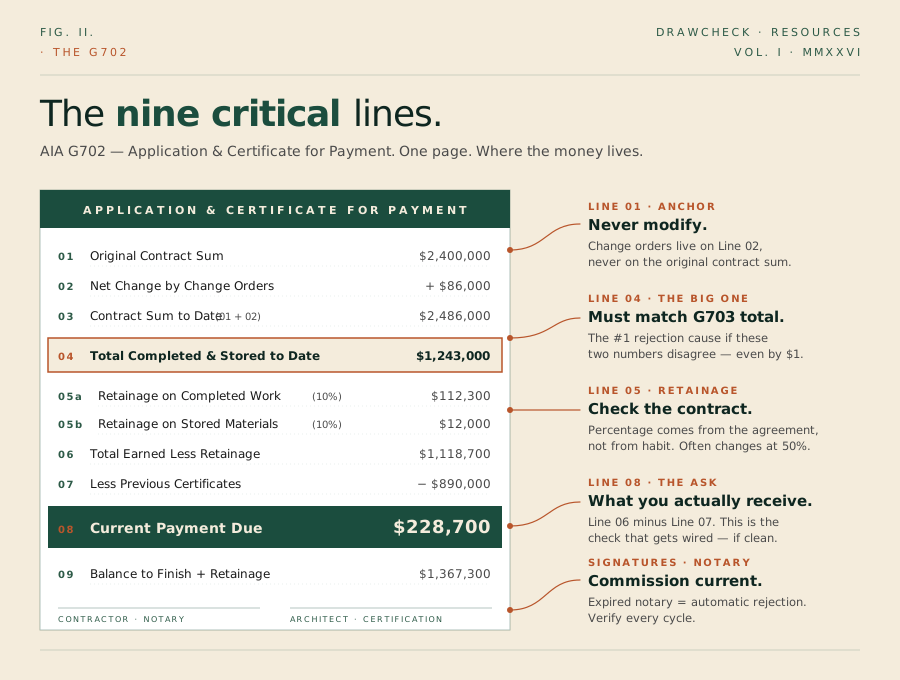
The G702: Line by Line
Line 1 — Original Contract Sum. The contract amount at signing. This number never changes, no matter how many change orders come through. Write it once and leave it alone.
Line 2 — Net Change by Change Orders. The cumulative total of all approved change orders to date. Additions and deductions netted together. Only approved change orders — nothing pending, nothing verbal.
Line 3 — Contract Sum to Date. Line 1 plus Line 2. Simple addition.
Line 4 — Total Completed and Stored to Date. This is the big one. It pulls directly from the G703 — the grand total of all work completed and materials stored across every line item. If this number does not match the G703 total exactly, stop. Fix it before anything else.
Line 5 — Retainage.
- 5a: Retainage on completed work (typically 5% or 10% of work in place)
- 5b: Retainage on stored materials (same percentage, applied to materials not yet installed)
The retainage percentage comes from your contract. Not from what you feel like withholding. Check the contract. Then check it again.
Line 6 — Total Earned Less Retainage. Line 4 minus Line 5a minus Line 5b.
Line 7 — Less Previous Certificates for Payment. The cumulative amount paid on all prior pay applications.
Line 8 — Current Payment Due. Line 6 minus Line 7. This is your actual payment request.
Line 9 — Balance to Finish, Including Retainage. Line 3 minus Line 6.
The G703: Column by Column
Column A — Item Number. Sequential numbering.
Column B — Description of Work. Match your original SOV descriptions exactly.
Column C — Scheduled Value. The dollar amount budgeted for this line item.
Column D — Work Completed from Previous Applications. Carry forward from last month accurately.
Column E — Work Completed This Period.
Column F — Materials Presently Stored. Requires backup documentation.
Column G — Total Completed and Stored to Date. D + E + F.
Column H — Percentage Complete. Column G divided by Column C.
Column I — Balance to Finish. Column C minus Column G.
Column J — Retainage. Tracks line-item retainage when variable rates apply.
The grand total of Column G must match Line 4 on the G702. That single cross-reference point is the most common source of draw rejections.
Retainage Calculations: Where the Math Gets Tricky
Say your contract calls for 10% retainage, reduced to 5% after 50% completion on each line item. Electrical line item — Scheduled Value: $200,000.
| Draw | Work This Period | Total to Date | % Complete | Retainage Rate | Retainage Held |
|---|---|---|---|---|---|
| 1 | $40,000 | $40,000 | 20% | 10% | $4,000 |
| 2 | $50,000 | $90,000 | 45% | 10% | $9,000 |
| 3 | $30,000 | $120,000 | 60% | 5% on new work | $10,500 |
In Draw 3, you crossed the 50% threshold. The reduced retainage rate applies only to work completed after reaching 50%, not retroactively to prior work. This is where most errors happen.
For more on how retainage works across the life of a project, see our retainage guide.
The Errors That Get Your Pay App Rejected
- G702 Line 4 does not match the G703 grand total. Automatic rejection.
- Retainage calculated at the wrong percentage.
- Change orders not reflected correctly. Never modify Line 1.
- Previous payment amount is wrong.
- Column D does not match last month's Column G.
- Billing for stored materials without backup.
- Rounding errors that compound.
- Missing notary stamp or expired commission.
- Overbilling a line item without a change order.
- Wrong dates or draw period. Must be consistent across all documents including lien waivers.
A Pre-Submission Checklist
- G703 Column G grand total matches G702 Line 4
- G702 Line 3 equals Line 1 plus Line 2
- G702 Line 8 equals Line 6 minus Line 7
- Retainage percentage matches the contract
- All change orders are approved and documented
- Previous payment amounts match owner records
- Column D this month matches Column G from last month
- Stored materials have vendor invoices, delivery tickets, and photos
- Notary commission is current and stamp is legible
- Billing period dates are consistent across all documents
- All required signatures are present
- Sub invoices reconcile with sub line items on the G703
Twelve checks. Takes about 30 minutes. Saves weeks of back-and-forth.
One review. Flat fee. Fast turnaround.
You have buildings to build. The G702 and G703 are administrative precision work — one wrong number cascades through the entire draw package and delays payment by weeks.
DrawCheck reviews your complete pay application for accuracy, cross-references every document in the package, and flags errors before the lender ever sees them.
Get Your Draw Checked →Or write to info@drawcheck.co